Tasks
Manage and track tasks linked with contacts, companies, leads, and deals.
The Tasks Module helps you organize and track all your to-dos within the CRM.
Tasks can be associated with Contacts, Companies, Leads, or Deals, ensuring you never miss a follow-up.
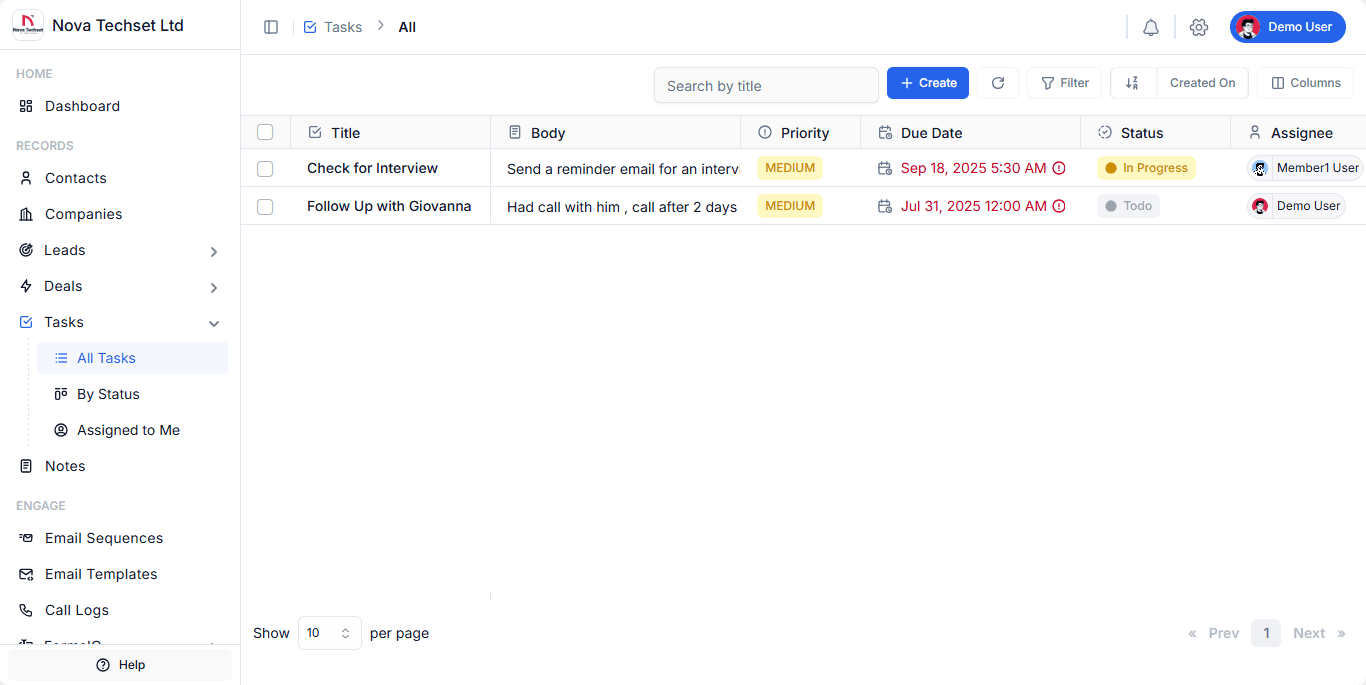
Key Features
-
Task Creation
Create tasks with a title, description, due date, priority, and status. -
Prioritization
Mark tasks as Low, Medium, or High to focus on what matters most. -
Due Dates
Set deadlines and get reminders when tasks are overdue. -
Statuses
Track tasks with customizable statuses like Todo, In Progress, Done. -
Assignments
Assign tasks to yourself or team members for better collaboration. -
Task Views
- All Tasks – See every task in the system.
- By Status – Filter tasks by their current progress.
- Assigned to Me – View only tasks assigned to you.
-
Search and Filters
Quickly find tasks by title, status, assignee, or due date.
Workflow
-
Create a Task
- Click the + Create button.
- Enter task details (title, body, priority, due date).
- Assign the task to a user.
- Select a status (e.g., Todo, In Progress).
-
Track Progress
- Update the status as work moves forward.
- Use filters to view tasks by status or assignee.
-
Complete a Task
- Mark tasks as Done once completed.
- Completed tasks remain logged for future reference.
Example Use Cases
- Sales Follow-Up: Create a task to call a lead after a demo.
- Recruitment: Schedule reminders for interview follow-ups.
- Customer Success: Assign tasks to team members to resolve client issues.
Best Practices
- Always set due dates to stay on top of deadlines.
- Assign tasks to specific team members for accountability.
- Use priority levels to focus on the most important work.
- Regularly check Assigned to Me to manage your workload.
Related Modules
- Contacts – Link tasks to people.
- Companies – Associate tasks with organizations.
- Leads – Track lead follow-up tasks.
- Deals – Manage deal-related activities.