Members
Manage workspace members, roles, invite links, and email invitations.
Members
The Members Module allows you to manage all users in your workspace.
From here, you can invite new members, assign roles, adjust daily limits, and remove users when needed.
You can access it from:
Settings → Workspace → Members
Invite by Link
Invite team members quickly using a secure join link.
- A unique workspace invite link is automatically generated.
- Click Copy Link to share it with your team.
- Anyone with the link can create an account and join the workspace.

⚠️ For security, periodically regenerate or disable old invite links if necessary.
Manage Members
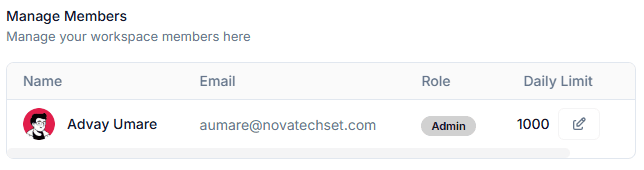
This section lists all existing members in the workspace along with:
- Name
- Role (Admin, Member, Custom Roles)
- Daily Limit (e.g., daily email/sequence/send limits depending on your CRM features)
Editing Daily Limits
Click the edit icon next to the Daily Limit field to adjust a member’s allowed daily limit.
Roles
Roles define a member’s permissions throughout the system.
(See Roles & Permissions documentation for more detail.)
Invite By Email
Invite users directly via email.
Steps:
- Enter the user’s email address in the input field.
- Click Send Invite.
- The invited user will receive an email with instructions to join.
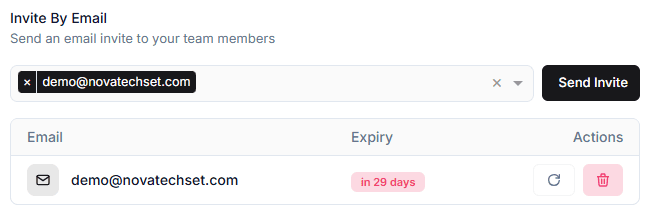
Pending invites appear below the input:
- Email of invited user
- Expiry date (e.g., “in 29 days”)
- Actions:
- Resend Invite
- Delete Invite
Pending Invites
Pending invitations show:
- Status of the invite
- Expiration timeline
- Ability to resend or remove an invite
Invites typically expire in 30 days.
Best Practices
- Assign the appropriate roles to maintain workspace security.
- Use invite by link for quick onboarding of multiple users.
- Use email invites when inviting specific individuals privately.
- Regularly review member access and remove inactive or former employees.
- Set reasonable daily limits to prevent misuse or system overload.